Transparent Online Protractor
This transparent online protractor allows you to easily measure angles of any object or image in real-time. Whether you are measuring directly on your screen or using a captured photo, simply upload your image and drag the virtual protractor's midpoint to the angle's vertex for a precise reading. Designed for maximum accuracy, our tool supports zooming, rotating, and repositioning. Even better, you can switch to camera mode to turn your device into a professional angle finder instantly.
How to use this Online Protractor?
This versatile tool allows you to measure angles on your screen with ease. Below are the ways you can interact with the protractor and the background.
1. Controlling the Protractor
- Move: Click and drag the midpoint (center) to reposition it.
- Rotate: Drag the edges near the 0° or 180° marks to rotate, just like a physical protractor.
- Resize: Drag the edge near the 90° mark to change the radius (make it larger or smaller).
- Visual Guides: Simply hover your mouse over different areas to see helpful operation prompts.
2. Measuring with Pushpins
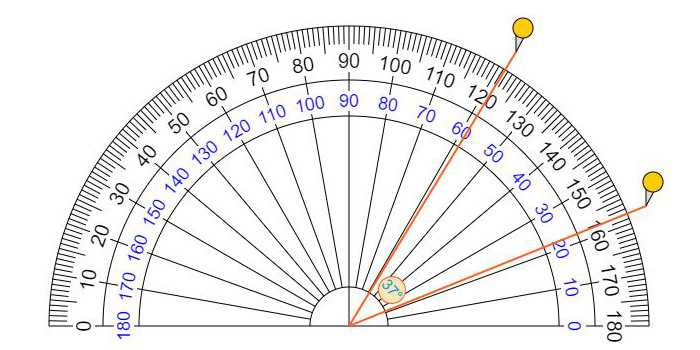
- Add Pins: Click on the outer edge of the protractor to place a pushpin.
- Measure: Place two pushpins to automatically display the degrees of the angle between them.
- Edit Pins: Drag a pin to adjust its position, or double-click it to remove it.
3. Background & Image Tools
- Upload Images: Drag and drop a file, press Ctrl+V to paste a screenshot, or use the "Choose Picture" button.
- Adjust Background: Hold Ctrl and drag to move the background image, or use the zoom tools to align it perfectly.
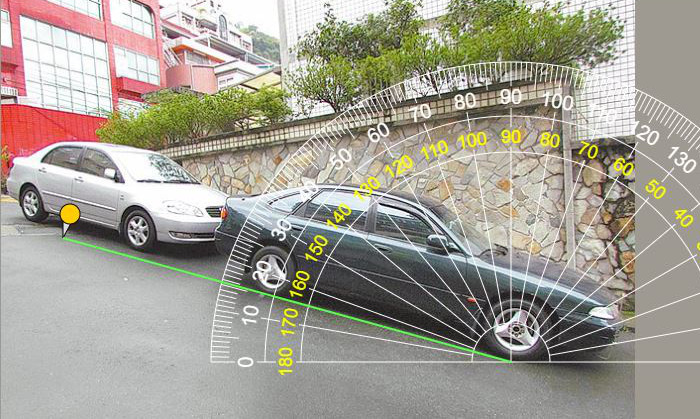
- Camera Mode: Turn on the camera to make the protractor transparent, allowing you to measure real-world objects via your webcam or smartphone.
4. Tips for Best Experience
- Mobile Users: Since mobile browsers don't support drag-and-drop, please use the provided buttons in the control panel for all adjustments.
- Save & Share: Once your measurement is complete, you can download your result or share the design with others for free.
🔒 Your Privacy Matters: This tool is a pure client-side application. Whether you upload a photo, paste an image, or use your camera, all data is processed locally within your browser. We do not upload, store, or see your files or camera feed on our servers, ensuring 100% privacy and security for your personal or professional work.
The story of our protractor
Every time I want to measure the angle, I always can't find the protractor. After I tried other peoples's virtual protractors on the Internet, I didn't feel very satified, so I decided to created a more practical online protractor by myself. This idea was in my mind, I thought about it for a whole year, and then I took some time to make it when I was free.
Such a convenient and useful thing, I must share it with you all, so we're all lucky today, here is a handy and useful online protractor. Now, we can measure the angle of anything around us anytime, anywhere using our laptop, computer, tablet or smartphone.
If you want to measure something that is small, just place it on the screen and measure it directly; If you want to measure something bigger, you can take a picture and upload it, then move the center point of the protractor to measure its angle.
Measure Angles Using Camera or Images
Easily measure the angle of real-world objects—such as cars, roads, buildings, or landscapes—by capturing a photo or uploading an existing file. Our transparent online protractor serves as a virtual overlay, displaying your image perfectly in the background. Simply drag the protractor or place pushpins to calculate precise degrees. Supported image formats include JPG, GIF, PNG, SVG, and WebP.
Customizable Controls for Better Visibility
To ensure maximum precision, you can fully customize the protractor's appearance in the Control Panel. If the background image makes the scale hard to read, simply change the protractor's color for better contrast. You can also move, rotate, or adjust the size (radius) of the protractor to align perfectly with your target object.
Angles and Degrees
- Angles are measured in degrees, the symbol for degrees is a little circle °
- The full circle is 360° (360 degrees)
- A half circle or a straight angle is 180°(180 degrees)
- A quarter circle or a right angle is 90°(90 degrees)
How to measure an angle with a protractor
- Place the midpoint of the protractor on the vertex of the angle.
- Line up one side of the angle with the zero line of the protractor (where you see the number 0).
- Read the degrees where the other side crosses the number scale.
- Take care to read from the right set of numbers.
A protractor has two sets of numbers: one set goes from 0 to 180, the other set from 180 to 0.
Which one you read depends on how you place the protractor:
place it so that one side of the angle lines up with one of the zeros, and read that set of numbers.
Translate into your native language
We hope to provide a more user-friendly experience, are you willing to offer a native language version for your country ? We are looking for volunteer to improve the content in your native language, if you are interested to help this, please visit this translation page. Below are some other language version.
Our Facebook Pages
Online rulers
- Online ruler : The most accurate size ruler on the web.
- Metric scale ruler : variable scale ruler with metric units(cm, m, km)
- Imperial scale ruler : variable scale ruler with imperial units(in, ft, yd, mi)