Vertical Virtual Ruler
This is a web-based vertical ruler designed for instant use with no installation required, it allows you to easily measure objects directly on your screen. This tool is optimized for mobile phone screens, making it ideal for quick measurements anytime, anywhere. To ensure maximum accuracy, we recommend performing a quick calibration before first use.
How to calibrate the ruler
- Tell me your screen diagonal size (in inches), and I can calculate and set it for you directly. set screen size
Your screen resolution is pixels, based on a your PPI setting , your screen size(diagonal) should be inches(68.6 centimeters), width: inches( centimeters), height: inches( centimeters). - Take a standard size credit card for comparison, select the option "standard credit card" to begin calibration mode, enlarge or reduce the scale until both are the same length, save the setting, then you can use this ruler directly next time. The standard size of the credit card is 85.60 mm x 53.98 mm (3 3/8 inches x 2 1/8 inches), the same as the size of ATM cards and other debit cards, you can use anything for comparison as long as you know its size.
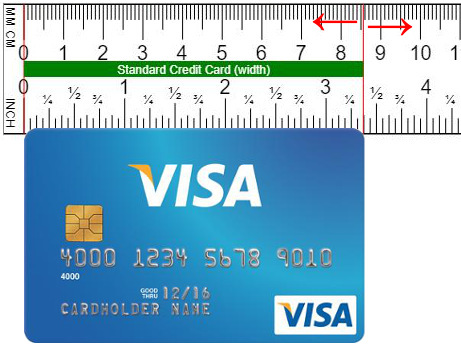
This vertical ruler, the left half is a centimeter ruler, the right half is an inch ruler.
Clicking on the ruler will display a red line, making it easy to see the correspondence between metric units (millimeters and centimeters) and imperial units (inches).
Vertical ruler or horizontal ruler
Because mobile phone screens are longer vertically, a vertical ruler is more suitable for use on mobile phones, while a horizontal ruler is more suitable for use on desktop monitors.
Pop up ruler
I know the pop-up window is narrow, there's nowhere to drag it, and the move option is hidden in the window top icon. You can widen the window, then move it, and finally narrow it back.
Browser zoom level
The zoom ratio of current page is 100%, we recommend using a fixed zoom ratio of 100%, different zoom ratios will affect the accuracy of the ruler, please compare the physical item and calibrate the setting by yourself.
Changing the system font size on the phone will affect the layout of the web page, just use the pinch gesture to bring your fingers together to reduce the page size, zoom out to the minimum and you can see the full size ruler.
Our Facebook Pages
Try the ruler on your smartphone
Provide more suitable localized translations
This page was translated by Google Translate and may contain inaccuracies. If you would like to help improve the text, please click the button below to edit